Your server fleet, under new management.
lomiri is the cloud-native game server panel, built on blazing-fast Bun and TypeScript. A slick, modern UI, every feature built in, and it work straight with wings nodes you already have.
PanteonMC SMP
fra-1 · 10.0.4.12:25565
14:02:11 container@lomiri~ Server marked as starting...
14:02:12 container@lomiri~ Pulling ghcr.io/pelican-eggs/java:21
14:02:14 [Server thread/INFO]: Starting minecraft server version 1.21.11
14:02:14 [Server thread/INFO]: Loading properties
14:02:15 [Server thread/INFO]: Preparing level "world"
14:02:19 [Server thread/WARN]: Can't keep up! Is the server overloaded?
14:02:21 [Server thread/INFO]: Done (6.912s)! For help, type "help"
14:02:21 container@lomiri~ Server marked as running
>whitelist add ShadowBebop
CPU
38% / 400%
Memory
3.1 / 8 GiB
Disk
12.4 / 40 GiB
Why lomiri
Modern from the ground up. Built to scale.
Cloud-native, blazing fast and packed with features, without giving up compatibility with the Wings fleet you already run.
Cloud-native
No more legacy /var/www installations. lomiri deploys and scales with docker/k8s as a first-class citizen.
Scales out
Run as many API or UI replicas as your traffic needs. The industry standard comes to game panels.
Blazing fast
Powered by Bun and handles load really well. Instant loads, the API answers fast, and no obscure PHP errors.
Slick, modern UI
A dark, fast, responsive panel for admins and users alike, from the live console to the file editor, on desktop or phone.
Self-healing
lomiri keeps checking your fleet: it fixes power-state drift and unsticks stalled transfers before anyone files a ticket.
Drop-in for Wings
Built for existing nodes, lomiri is compatible with Pelican's Wings agent, so your existing servers just keep working.
Everything you expect, out of the box
- Live console
- File manager & editor
- Backups, local & S3
- Schedules
- Databases
- Subusers & permissions
- Webhooks
- Activity log
- SFTP
- Server transfers
- OAuth sign-in
- Admin roles
- Mounts
- Egg import & export
- API keys
- Multilanguage
Modules
Built in, not bolted on.
No plugin roulette. Modules ship with the panel and switch on with one click in Admin → Modules.
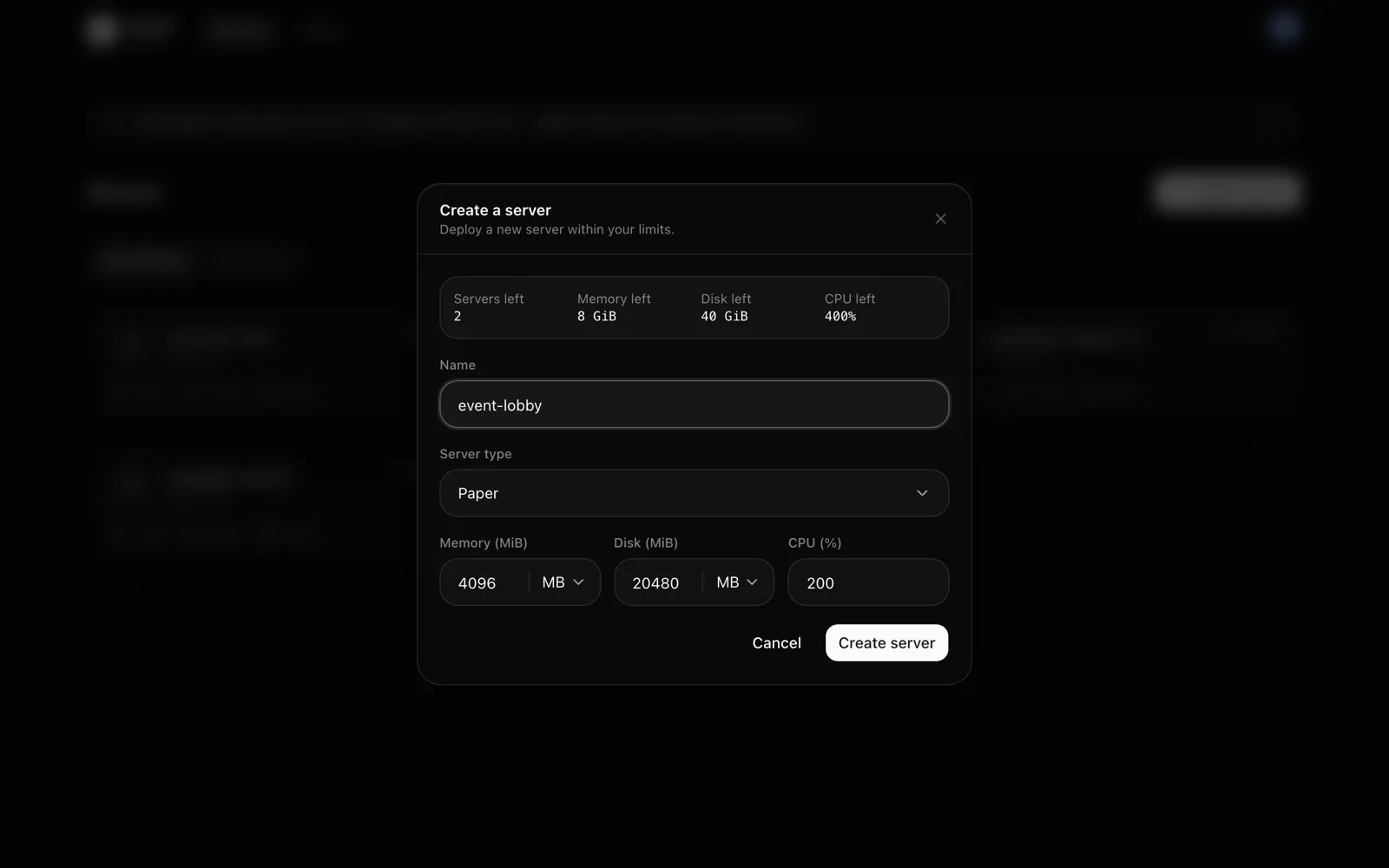
Users spin up their own servers.
Pick which server eggs users may deploy and set their limits: servers, CPU, memory, disk, plus allocations, databases and backups per server. Give specific users their own limits, and let lomiri place each server on a node with room for it.
- Per-user overrides
- Automatic or user-chosen placement
- Limits enforced on every create
Who it's for
For MC admins and hostings alike.
Minecraft admins & communities
Simple enough for your first server, powerful enough for a whole network.
- A clean UI your staff can pick up in minutes
- Full control over every instance: console, files, schedules, backups and databases
- Share servers with subusers and fine-grained permissions
- Self-hosted: your servers, your data, your rules
Hosting providers
The foundation for a hosting business: automate it, protect it, scale it.
- Pelican-compatible APIs and an official TypeScript SDK for billing and provisioning
- Rate limiting across the API, logins, tokens and SFTP
- OAuth single sign-on for your customers
- Self-healing workers and an API that scales out
Migration
Switch panels in an hour. Not a weekend.
Users, nodes, eggs and servers come across with their ids and UUIDs intact. Your game servers and their files never leave your nodes.
- 1
Deploy lomiri
Two containers next to your current panel, up in minutes.
- 2
Rehearse
Dry-run the importer against your Pelican database. It reports what it would bring over and changes nothing.
- 3
Import and reconnect
Import for real, then point each node's Wings at lomiri. Servers and their files stay exactly where they are.
- Read the migration guide
# 1. start lomiri
$ docker compose up -d

# 2. rehearse against your Pelican database
$ docker compose exec -e SOURCE_DATABASE_URL=postgres://… \
    api bun run db:import --dry-run
[import] dry run (no writes): { users: 412, nodes: 9, servers: 1384, … }

# 3. import for real
$ docker compose exec -e SOURCE_DATABASE_URL=postgres://… \
    api bun run db:import

# 4. on each node: new remote + token, then
node1~$ systemctl restart wings
Roadmap
First replace. Then embrace.
Where lomiri is today, and where it's headed.
Public beta
Available today: Wings and the Pelican APIs, the Pelican importer and every built-in module.
- Wings support
- Pelican-compatible APIs
- Pelican DB importer
- Built-in modules
Stable release
Production-ready solution for most demanding workloads, as a drop-in replacement.
- Full self-service platform
- Pterodactyl DB importer
- Customization and theming
- More modules
New agent & CI/CD
Dropping backwards compatibility and going beyond any pterodactyl plugin ever did.
- Better guardrails and microVMs
- Built-in reverse proxy
- Image builds from git
- Node lifecycle management
Long-term support
After 2.0 moves past Pelican compatibility, fixes and security patches keep landing on the Pelican-compatible 1.x line.
- Fixes & security patches
- Stays Pelican-compatible
- We are herev0.8Shipped
Public beta
Available today: Wings and the Pelican APIs, the Pelican importer and every built-in module.
- Wings support
- Pelican-compatible APIs
- Pelican DB importer
- Built-in modules
- v1.0In progress
Stable release
Production-ready solution for most demanding workloads, as a drop-in replacement.
- Full self-service platform
- Pterodactyl DB importer
- Customization and theming
- More modules
- v2.0Planned
New agent & CI/CD
Dropping backwards compatibility and going beyond any pterodactyl plugin ever did.
- Better guardrails and microVMs
- Built-in reverse proxy
- Image builds from git
- Node lifecycle management
- 1.x linev1 LTSPlanned
Long-term support
After 2.0 moves past Pelican compatibility, fixes and security patches keep landing on the Pelican-compatible 1.x line.
- Fixes & security patches
- Stays Pelican-compatible
Replace legacy panels. Keep your nodes.
Up and running with Docker in minutes, or migrated from Pelican by the end of the day.